Upstore Free vs Premium: Real Speed Tests, 24-Min Wait & Limits (2026)
This page is a direct benchmark, not a feature comparison copied from a marketing page. We ran the same files through both an Upstore Free account and an Upstore Premium account on the same connection, the same day, using the same two clients: a browser and JDownloader 2. The numbers below — 68.5 KB/s, the 24-minute IP cooldown, 21.8 MB/s in Chrome, 46.24 MiB/s in JDownloader 2 — are the actual figures recorded during testing, not rounded marketing claims.
Every other troubleshooting page on this site (JDownloader 2 errors, slow download fixes, payment issues) references the data on this page. If you only read one Upstore page on this site, this is the one with the source numbers.
Executive Summary: Free vs Premium at a Glance
| Metric | Upstore Free | Upstore Premium |
|---|---|---|
| Pre-download wait | 28–37 second countdown + hCaptcha | None — link resolves immediately |
| 83.17 MB RAR file | ~18 minutes (UI estimate) | ~17 seconds |
| 361.73 MB MP4 file | ~1 hour (UI estimate) | ~1 minute |
| 858 MB RAR, single file, browser | 68.5 KB/s (~4 hours remaining) | 11.5 MB/s (~30 seconds) |
| 3 parallel files in Chrome | Not permitted (1 active download limit) | ~21.8 MB/s combined (8.7 + 6.9 + 6.2 MB/s) |
| 4-file batch in JDownloader 2 | Blocked by captcha + IP cooldown | 39.95 MiB/s sustained, 46.24 MiB/s average |
| Wait between files | 24-minute IP cooldown per file | No cooldown, immediate next file |
| Resume on interrupted transfer | Not supported — restart from 0% | Supported in browser and JDownloader 2 |
Testing Methodology & Environment
- Connection: 500 Mbps fiber broadband, direct ISP route, tested from a residential IP (no VPN, no proxy).
- Test clients: Google Chrome (v124+) for browser-side downloads, JDownloader 2 (Build Revision 48xxx+) for batch/queue testing.
- Test files: Real sample archives — 361.73 MB MP4, 83.17 MB RAR, 858 MB RAR, plus multi-gigabyte split archive parts (1.074 GiB, 1.135 GiB, 857.969 MiB, 766.956 MiB) for the JDownloader 2 batch run.
- Accounts used: One standard Upstore Free account and one paid Upstore Premium account, tested back-to-back on the same files where possible.
- What this does not control for: Upstore’s server load varies by time of day and by which storage node your file is hosted on. Treat the numbers below as a realistic range from our connection, not a guaranteed result for every network.
Section 1: The 4 Roadblocks of Upstore Free Mode
Free mode on Upstore isn’t “slightly slower” — it’s four separate restrictions stacked on top of each other. Each one by itself is tolerable. Together, they make anything beyond a single small file impractical.
Roadblock 1: The Countdown Timer
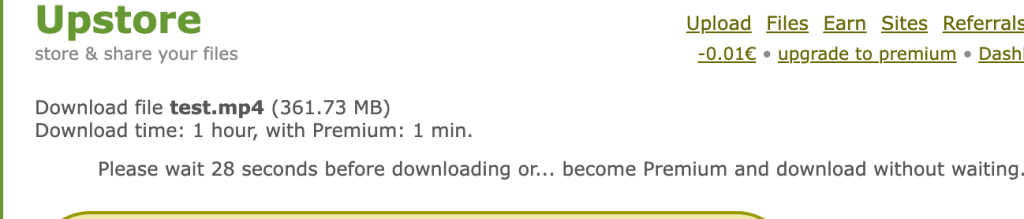
Before Upstore shows a free download link, it runs a countdown — 28 to 37 seconds in our tests, varying slightly by file and server load. For the 361.73 MB MP4 file, the download page itself displayed an estimated time of 1 hour for free users, against 1 minute for Premium, directly on the same screen.
Roadblock 2: Mandatory hCaptcha
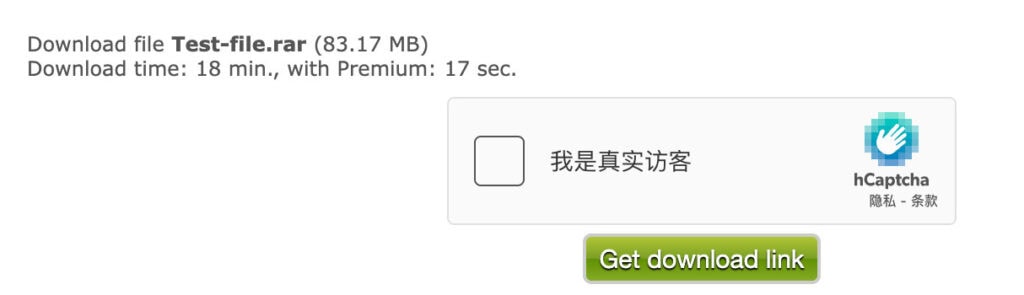
After the countdown finishes, free users must solve an interactive hCaptcha challenge before the “Get download link” button activates. This isn’t optional and isn’t skippable with a simple page refresh. On the 83.17 MB RAR file, Upstore’s own interface quoted an 18-minute estimated completion time for free users, versus 17 seconds for Premium — the captcha step is a meaningful part of that gap, not just the transfer speed.
Roadblock 3: The ~68.5 KB/s Speed Throttle
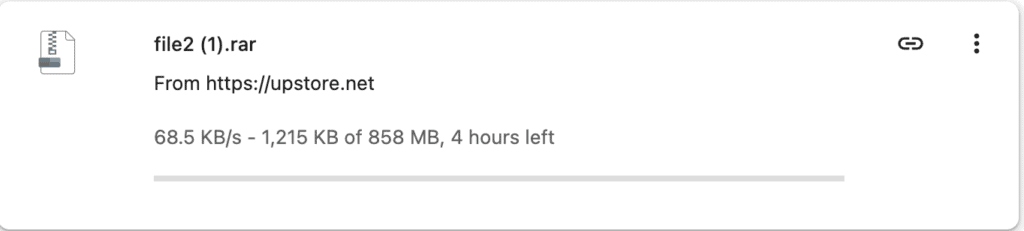
Once the free download actually starts, Chrome recorded a sustained transfer rate of 68.5 KB/s on the 858 MB RAR file, with the browser’s own time estimate showing roughly 4 hours remaining. This is a server-side cap applied to the free account tier — it is not caused by your browser, your Wi-Fi, or your ISP. For a breakdown of what is and isn’t fixable on the client side, see our slow download troubleshooting guide.
Roadblock 4: The 24-Minute IP Cooldown
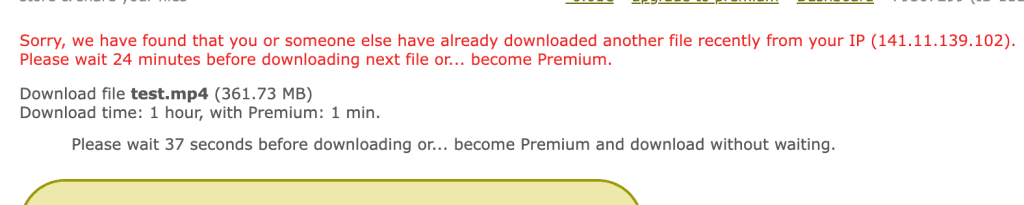
This is the roadblock that breaks multi-file and multi-part downloads completely. Immediately after one free download finishes, Upstore flags the IP address and displays a cooldown warning before a second file can start — 24 minutes in our test. For a 10-part RAR archive, that’s 24 minutes of enforced waiting between each part, stacked on top of the 68.5 KB/s throttle and the per-file captcha. A batch that takes 2 minutes on Premium can take most of a day on Free mode.
Section 2: Premium Browser Speed Benchmarks
Single-File Test: 68.5 KB/s → 11.5 MB/s
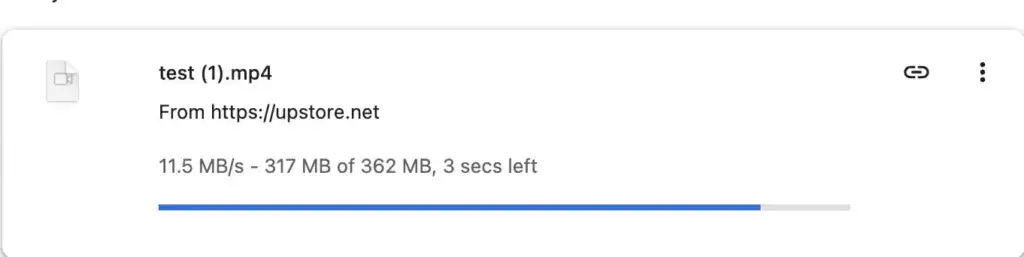
Logging into the same browser with a Premium account and re-downloading a comparable 362 MB file produced an immediate, sustained 11.5 MB/s — roughly 170x the free-tier throughput — with the full transfer completing in about 30 seconds. No countdown, no captcha, no cooldown screen.
Three Parallel Files: 21.8 MB/s Combined
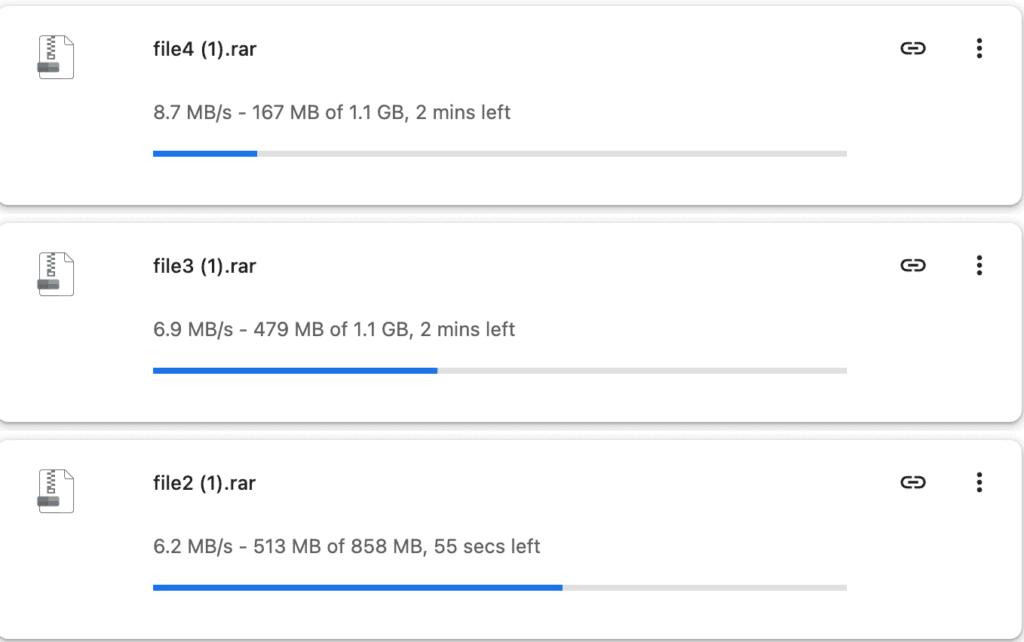
We then started three archives simultaneously in Chrome — two 1.1 GB files and one 858 MB file — to see how Premium handles concurrent transfers rather than a single stream:
file4 (1).rar(1.1 GB): 8.7 MB/sfile3 (1).rar(1.1 GB): 6.9 MB/sfile2 (1).rar(858 MB): 6.2 MB/s- Combined throughput: ~21.8 MB/s (roughly 175 Mbps of the available 500 Mbps link)
Why a Single Browser Download Plateaus Around 8–12 MB/s
This is the detail most comparison pages skip. A single HTTP download in a browser runs over one TCP connection. The maximum throughput of one TCP connection is governed by the bandwidth-delay product (BDP) — effectively, your TCP window size divided by the round-trip time (RTT) to the server. Upstore’s storage infrastructure is hosted in European data centers, and round-trip latency from most non-European residential connections sits in the 30–90ms range depending on routing.
At that latency, a single TCP stream — even with modern window scaling enabled — typically plateaus somewhere between 8 MB/s and 12 MB/s on a well-provisioned link, regardless of whether your local connection is rated for 500 Mbps. The bottleneck isn’t your local bandwidth; it’s the physics of one connection waiting on acknowledgment round-trips across distance. This is exactly why our single-file test topped out at 11.5 MB/s even on a 500 Mbps line — the file server side and network path, not the local connection, set the ceiling for one stream.
Running multiple files in parallel sidesteps this limit because each file opens its own independent TCP connection, each with its own congestion window. Three separate 6–9 MB/s streams stack additively, which is how the combined Chrome test reached 21.8 MB/s — well above what any single connection could achieve alone, while still comfortably inside the 500 Mbps link capacity.
Section 3: JDownloader 2 Batch Queue Benchmark — 46.24 MiB/s
For anyone downloading more than two or three files, JDownloader 2 is the more relevant test than a browser, because it manages multiple simultaneous connections automatically instead of requiring you to manually open several browser tabs.
We added the same Premium account to JDownloader 2’s Account Manager and queued four large archives at once: 1.074 GiB, 1.135 GiB, 857.969 MiB, and 766.956 MiB. Individual files pulled between roughly 8.40 MiB/s and 10.23 MiB/s each — consistent with the single-thread ceiling described above — but because JDownloader 2 ran all four as parallel connections, the aggregate speed graph recorded:
- 39.95 MiB/s sustained current speed
- 46.24 MiB/s rolling average across the batch
At that throughput, all four gigabyte-class archives finished in roughly one to two minutes combined — the same batch that would have required multiple 24-minute cooldowns plus hours of throttled transfer time on a Free account. If JDownloader 2 doesn’t pick up your Premium status correctly or shows a plugin error, the fix is almost always a clean re-add of the account — the full steps are in our JDownloader 2 troubleshooting guide.

Section 4: Decision Matrix — When Is Free Enough vs. When Is Premium Mandatory?
| Your Situation | Recommended | Why |
|---|---|---|
| One file under ~50 MB, not Premium-locked | Free | The countdown and captcha cost a few minutes once; not worth paying for a single small file. |
| One file in the 300 MB – 5 GB range | Premium | Free mode’s 68.5 KB/s cap turns this into a multi-hour wait; Premium finishes in under a minute. |
| Multi-part RAR archive (3+ parts) | Premium | Each part triggers a separate 24-minute IP cooldown on Free — the wait compounds per part. |
| Batch queue via JDownloader 2 | Premium | Free accounts get blocked by captcha and IP cooldowns before JDownloader 2 can queue more than one file. |
| Testing whether a link is still valid | Free | No need to pay just to confirm a file exists — check it free first, then upgrade if it’s real and large. |
| Download interrupted midway, need resume | Premium | Free mode has no resume support; an interrupted transfer restarts from 0% after the cooldown. |
If your payment attempt for Premium fails before you can even run these comparisons yourself, that’s a separate and usually unrelated issue — see our payment decline troubleshooting guide for the common causes (bank blocks, VPN mismatches, 3D Secure failures).
Final Verdict
The data is consistent across every test we ran: Free mode is functional only for small, single, non-urgent downloads. The combination of the 68.5 KB/s cap and the 24-minute per-file cooldown makes anything larger — or anything in multiple parts — impractical rather than just slow. Premium removed every one of the four roadblocks in our testing and delivered 21.8 MB/s in Chrome with three parallel files, and 46.24 MiB/s average in JDownloader 2 across a four-file batch.
If your download needs match the “Premium mandatory” rows in the table above, check current plan pricing and terms before buying.