
Updated June 2026.
If your Upstore download is stuck at very low speed, the first thing to understand is whether you are using free access or a Premium account. Free downloads are normally throttled by the server, while Premium downloads should be much faster but can still be affected by browser problems, VPN routing, JDownloader 2 settings, or temporary server load.
This guide explains what you can realistically fix, what you cannot bypass, and when upgrading to Upstore Premium is the only practical solution.
This site is not Upstore.net and is not the official Upstore website. It is an independent downloader guide based on practical testing and troubleshooting notes. Some links may be affiliate links, which means we may earn a commission if you buy through them, at no extra cost to you.
Quick Answer
If you are using free Upstore access, there is no real local trick to bypass the speed limit. Browser extensions, cache clearing, DNS changes, and random free proxies usually will not remove server-side throttling.
If you already have Upstore Premium and downloads are still slow, check your login status, VPN route, browser, Wi-Fi stability, JDownloader 2 account settings, and temporary server load.
Check Upstore Premium Compare Free vs Premium
Why Is Upstore Download So Slow?
Upstore speed depends mainly on your account type. Free users usually face strict speed limits, waiting timers, captcha checks, and delays between files. These limits are controlled by the filehost server, not by your browser.
That means most “speed tricks” do not work if the real cause is free-user throttling. Changing Chrome settings or clearing cache will not turn a free download slot into a Premium download slot.
| Cause | Affects Free Users? | Affects Premium Users? | Can You Fix It? |
|---|---|---|---|
| Free-user speed throttling | Yes | No, if Premium is active | Only by using Premium |
| Waiting timer | Yes | Usually removed | Only by logging in with Premium |
| Captcha checks | Usually yes | Usually removed | Premium helps |
| Bad VPN route | Possible | Possible | Try another route or disable VPN |
| Weak Wi-Fi or local network issue | Possible | Possible | Use wired connection or test another network |
| JDownloader account error | Less relevant | Possible | Refresh or re-add account |
| Temporary file server load | Possible | Possible | Try again later |
Free Upstore Speed Limit: What Our Test Showed
In our free Upstore download test, the file was heavily throttled. The screenshot below shows a download running at about 68.5 KB/s, with several hours remaining for an 858 MB file.
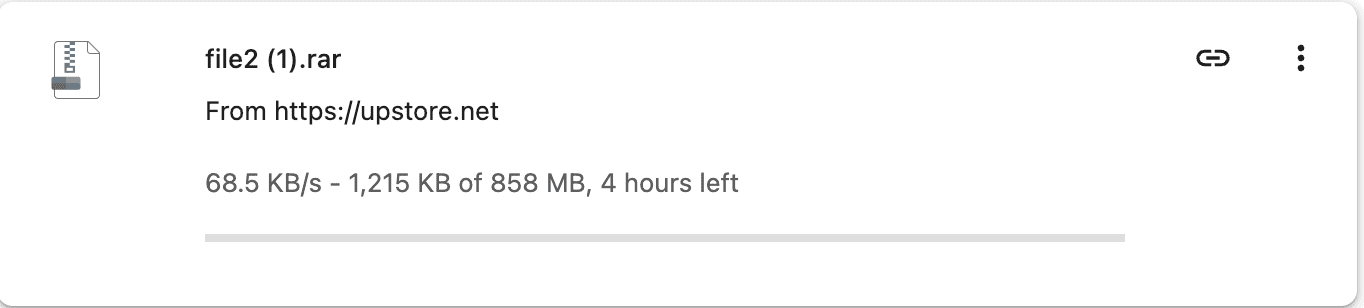
At this speed, free access is acceptable only for small files. For a large file or multi-part archive, the real problem is not just speed. You may also need to repeat waiting timers, captcha steps, and delay periods for each file part.
Do Browser Extensions Fix Upstore Slow Downloads?
No reliable browser extension can remove Upstore’s free-user speed limit. Extensions may change how links are opened or how downloads are managed, but they cannot change the account group assigned by the Upstore server.
Be careful with extensions that claim to unlock “unlimited Upstore speed” or “free Premium access.” Many of these tools are risky because they can push pop-ups, inject ads, redirect your browser, or collect browsing data.
Do VPNs Help with Upstore Speed?
A VPN can help only in specific cases. If your ISP route to Upstore is poor, a good VPN route may improve stability. But if you are a free user being throttled by Upstore’s server, a VPN will not turn your session into Premium access.
Free VPNs are usually a bad solution. They are often slower than your normal connection, unstable for large files, and more likely to disconnect before the download finishes.
Try this VPN check:
- Test once without VPN.
- Test once with a stable paid VPN route near your region.
- Avoid free proxy lists and browser proxy extensions.
- If the VPN is slower, turn it off.
- If Upstore blocks or resets the VPN route, use your normal connection.
Do DNS Changes or Cache Clearing Help?
Usually no. Changing DNS, clearing browser cache, or restarting the browser may fix a broken page load, but it will not remove Upstore’s free download speed cap.
These actions are worth trying only if the page itself is not loading, the download button does not appear, or the browser is stuck before the download starts. They are not real speed-limit fixes.
What Actually Helps Free Users?
If you are using free Upstore access, the realistic options are limited. You can make the process more stable, but you cannot fully bypass the free speed limit.
- Use a stable browser: Chrome, Edge, or Firefox is usually enough for one file.
- Keep the tab open: do not close the countdown or captcha page too early.
- Avoid unstable VPNs: a bad VPN can make slow downloads even slower.
- Download one file at a time: free access is not good for batches.
- Use Premium for large files: this is the only reliable fix for server-side throttling.
For one small file, free access may still be acceptable. For large files, repeated links, or RAR parts, Premium is usually the more practical option.
Free User Verdict
If your free download is slow, it is probably working as designed. You can improve stability, but you cannot reliably bypass the free-user speed limit with browser tricks, proxies, or extensions.
See Free vs Premium Limits Check Premium Access
Why Is Upstore Premium Still Slow?
If you already bought Upstore Premium and your speed is still poor, the issue may not be the normal free-user limit. It may be caused by login status, network routing, VPN settings, browser limits, temporary server load, or JDownloader 2 account detection.
1. Confirm Your Premium Account Is Active
Make sure you are logged into the correct Upstore account. If you bought Premium but still see free-user timers, your browser may not be logged in correctly, or the payment may not have activated on the account you are using.
- Log out and log in again.
- Check whether the account page shows Premium status.
- Confirm you did not buy Premium on a different email account.
- Check the payment receipt if activation is delayed.
2. Test Without VPN or Proxy
If Premium speed is unstable, disable your VPN or proxy and test the same file again. Some VPN routes are congested or blocked by filehost servers. A direct ISP route can be faster in many cases.
3. Try Another Browser
Browser extensions, download manager plugins, ad blockers, or privacy tools can sometimes interfere with filehost downloads. Test with a clean browser profile or another browser before assuming the account is broken.
4. Check Wi-Fi and Local Network Load
Slow Premium speed can come from your own network. If other devices are streaming, gaming, downloading updates, or backing up files, your available bandwidth may be lower than expected.
- Pause other downloads.
- Use wired Ethernet if possible.
- Restart the router if the network is unstable.
- Test a normal large file from another website to compare speed.
5. Try JDownloader 2 for Large Batches
For many links or archive parts, JDownloader 2 is often more reliable than manual browser downloads. Add your Upstore Premium account inside JDownloader’s Account Manager, then paste your links into LinkGrabber.

If JDownloader does not recognize Premium status, remove the Upstore account, restart JDownloader, and add the account again.
Read the full Upstore JDownloader 2 troubleshooting guide
Recommended Upstore Premium Speed Checklist
Use this checklist if your Premium download is slower than expected:
- Confirm Premium is active in your Upstore account.
- Log out and log back in.
- Test one file in a normal browser without VPN.
- Try another browser or a clean browser profile.
- Disable unstable VPNs, proxies, and suspicious extensions.
- Use JDownloader 2 for multiple links.
- Re-add your Upstore account in JDownloader if Premium status is missing.
- Pause other heavy downloads on your home network.
- Try again later if the specific file server seems overloaded.
Can You Bypass Upstore Free Limits?
No reliable bypass should be trusted. Upstore’s free limits are controlled on the server side. Tools claiming to bypass the speed limit usually do not provide real Premium access.
Avoid pages offering:
- Free Upstore Premium generators
- Unlimited Upstore speed unlockers
- Shared Premium login databases
- Browser extensions that promise Premium speed
- Random leech sites asking for your Upstore credentials
- Proxy tools that claim to remove all filehost limits
These tools often waste time and can create account or device security risks.
When Should You Upgrade?
Upgrade only when the time saved is worth the price. Premium is not necessary for every situation.
| Situation | Best Choice | Reason |
|---|---|---|
| One small file | Free access | Waiting may be acceptable |
| One large file | Premium | Free speed can take hours |
| Several archive parts | Premium | Repeated timers and captchas become inefficient |
| Many Upstore links | Premium + JDownloader 2 | Better for queue-based downloading |
| Testing whether a link works | Free access | No need to pay immediately |
Frequently Asked Questions
Why is Upstore free download so slow?
Free downloads are normally throttled by the server. This is expected behavior and not usually a browser problem.
Can I bypass Upstore speed limits?
No reliable bypass should be trusted. Browser extensions, free proxies, and generator sites usually cannot remove server-side free-user limits.
Does Upstore Premium fix slow downloads?
Premium removes the normal free-user speed throttling and waiting steps. However, final speed can still vary by network route, file server, VPN, browser, and download manager settings.
Why is my Premium download still slow?
Check whether Premium is active, disable VPN or proxy, test another browser, use JDownloader 2, and try again later if the file server appears overloaded.
Is JDownloader 2 faster for Upstore?
JDownloader 2 can be better for multiple links and archive parts because it manages queues, retries, and account login more efficiently than manual browser downloading.
Should I use a VPN for Upstore?
Only if your ISP route is poor. A bad VPN can make downloads slower, and a VPN will not bypass free-user account limits.
Final Recommendation
If you are on free access, slow speed is usually the expected limit. There is no clean local fix for server-side throttling. If you are on Premium and still slow, troubleshoot your login status, VPN, browser, JDownloader 2 setup, and local network first.
For one small file, free access may be enough. For large files, repeated links, or multi-part archives, Premium is the practical fix.
Check Upstore Premium Free vs Premium Details