
Upstore Premium Review 2026: Is It Worth It?
Updated June 2026. This independent Upstore Premium review is based on practical download tests, free-user restrictions, browser download behavior, and JDownloader 2 usage. The goal is simple: to help you decide whether paying for Upstore Premium actually saves enough time to justify the cost.
Upstore free access can work for one small file, but it becomes slow very quickly when you are downloading large files, video files, software archives, or multi-part RAR sets. Premium is mainly useful because it removes the free-user bottlenecks: low speed, waiting timers, captcha steps, and delays between files.
This site is not Upstore.net and is not the official Upstore website. It is an independent downloader guide. Some links may be affiliate links, which means we may earn a commission if you buy through them, at no extra cost to you.
Quick Verdict
Upstore Premium is worth it if you download large files, archive parts, or repeated Upstore links. In our test, free access was heavily throttled, while Premium downloads were fast enough for normal broadband use and much better for large batches.
- Worth it: large files, multi-part RAR archives, repeated download links, JDownloader 2 users.
- Not necessary: one small file, rare downloads, users who do not mind waiting.
- Avoid: fake Upstore Premium generators, shared accounts, unofficial login pages, and random leech tools.
Check Upstore Premium Compare Free vs Premium
Upstore Premium Pros and Cons
| Pros | Cons |
|---|---|
| Much faster than free downloads | Not worth it for one small file |
| No normal free-user waiting timer | Payment availability can depend on region and bank |
| Better for multi-part RAR archives | Speed can still vary by server, route, and time of day |
| Works better with JDownloader 2 | Account sharing can trigger restrictions |
| More practical for repeated downloads | Only useful if you actually download from Upstore regularly |
Real Upstore Speed Test Results
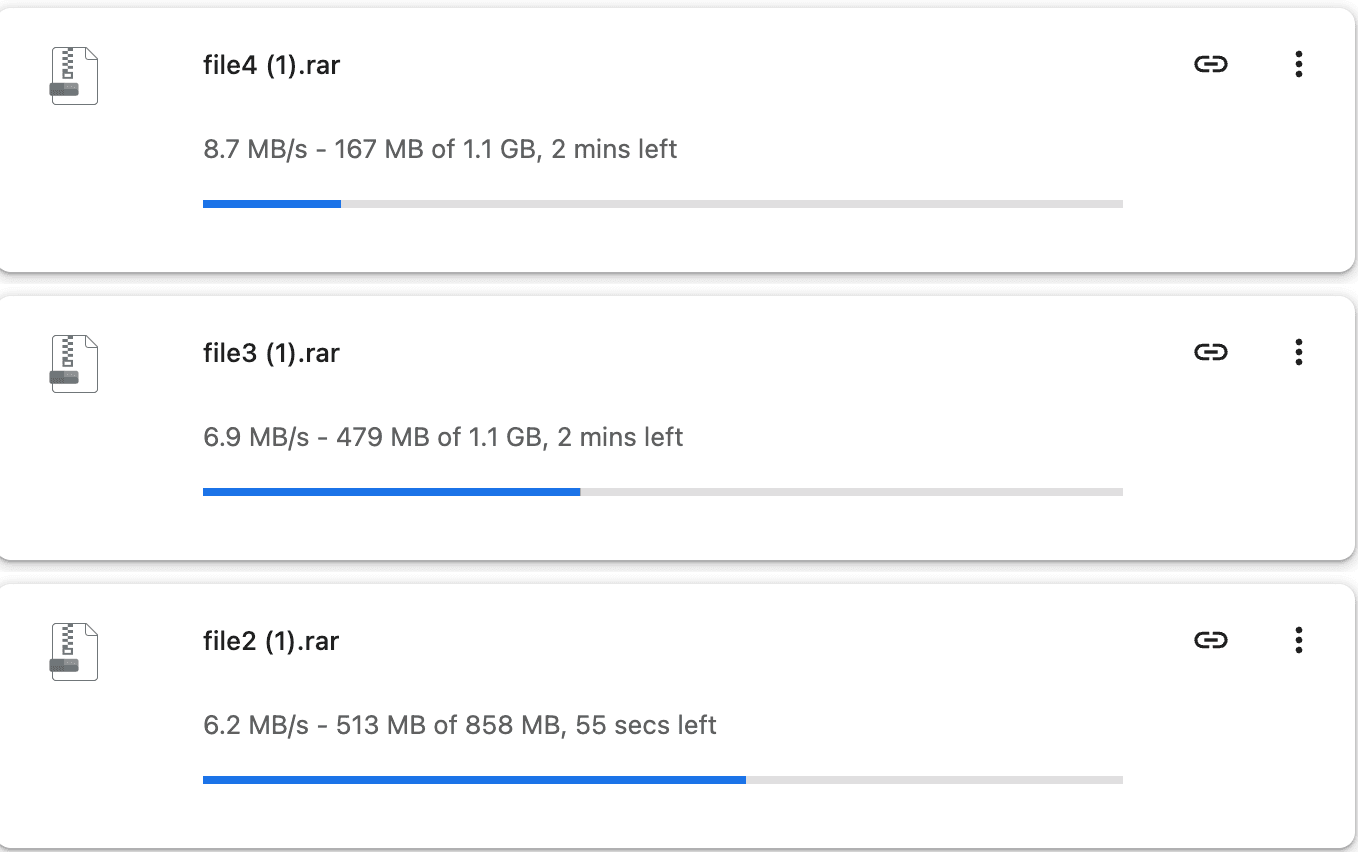
We tested Upstore using both free access and Premium access. The difference was clear. Free mode was heavily throttled and not practical for large files. Premium mode was much faster in both browser downloads and JDownloader 2.
Free Download Test
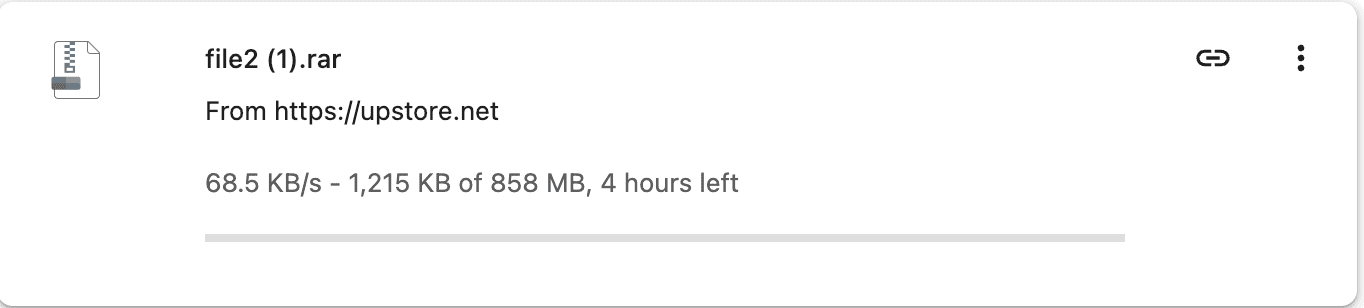
At this speed, a single medium-sized file can take hours. For multi-part archives, free access becomes even less practical because each part may require waiting, captcha checks, and additional delays.
Premium Browser Download Test
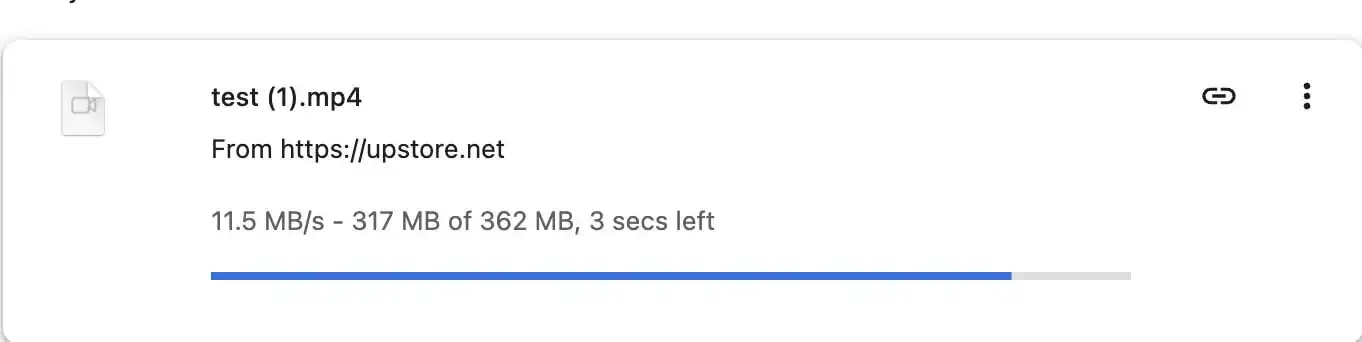
With Premium access, the same type of download becomes much more usable. Browser downloads started faster and were no longer limited like the free mode.
Premium JDownloader 2 Test

JDownloader 2 is especially useful when you have many Upstore links or archive parts. Instead of downloading each file manually, you can paste the full link list, add your Premium account, and let the downloader manage the queue.
Speed Test Conclusion
The practical difference is simple: free access is suitable only for small or occasional files. Premium access is much better for large files, repeated links, and multi-part archive downloads.
Check Premium Access See Free vs Premium Details
Upstore Free Account Restrictions
The free version of Upstore is designed for limited, occasional downloading. It is not built for large file batches. The main restrictions are speed throttling, waiting timers, captcha checks, and delays before the next file can begin.
- Slow speed: free downloads are heavily throttled and can take hours for medium or large files.
- Waiting timer: free users usually need to wait before the download link appears.
- Captcha checks: manual verification can interrupt the download process.
- Delay between files: after one file finishes, the next file may not start immediately.
- Poor batch workflow: downloading many archive parts manually is slow and inconvenient.
These limits are not unusual for file-hosting services. They are the main reason Premium accounts exist. The question is whether the time saved is worth the upgrade cost for your specific download batch.
What You Get with Upstore Premium
Upstore Premium mainly improves the download workflow. It does not magically guarantee the same speed for every user, but it removes the most painful free-user limits and makes large files much more practical.
| Feature | Free Access | Premium Access |
|---|---|---|
| Download speed | Heavily throttled | Much faster, depending on your connection and server route |
| Waiting timer | Required | Removed or greatly reduced for logged-in Premium users |
| Captcha | Usually required | Usually removed |
| Large files | Very slow | Much more practical |
| Multiple files | Difficult to manage | Better for browser queues and JDownloader 2 |
| Best use case | One small file | Large files, repeated links, archive parts |
Read the full Upstore Free vs Premium comparison
Is Upstore Premium Good for Multi-Part RAR Archives?
Yes. This is one of the clearest use cases for Premium. Many Upstore links are not single files. They may be split into several parts such as .part1.rar, .part2.rar, and .part3.rar. With free access, downloading these parts one by one can take a very long time.
Premium makes this workflow much easier because you can download files faster and handle multiple parts with fewer interruptions. For archive sets, the time saved can be significant.
Using Upstore Premium with JDownloader 2
JDownloader 2 is one of the better tools for managing large Upstore download batches. After adding your Premium login inside JDownloader’s Account Manager, you can paste a list of Upstore links and let the software manage the queue, retries, and archive parts.
Basic setup:
- Open JDownloader 2.
- Go to Settings → Account Manager.
- Add your Upstore account login.
- Wait for JDownloader to confirm Premium status.
- Paste your Upstore links into LinkGrabber.
- Start the downloads and monitor speed or failed links.
If JDownloader does not detect Premium status, remove the Upstore account, restart JDownloader, and add the account again. This often fixes temporary plugin or account-token issues.
Read the Upstore JDownloader 2 troubleshooting guide
Upstore Premium Pricing: Which Plan Should You Choose?
Upstore Premium plans usually vary by duration. A short plan is better if you only need to clear one download batch. A longer plan can make sense if you regularly download Upstore links and want a lower average daily cost.
- Choose a short plan if you only need to download one file set.
- Choose a longer plan if you download from Upstore regularly.
- Do not buy Premium if you only need one tiny file and do not mind waiting.
Always check the official checkout page before buying. Filehost prices, payment methods, reseller options, and renewal terms can change. This review is a practical guide, not a live billing page.
Read the Upstore Premium pricing guide
Payment and Account Safety
Some users may have payment issues because filehost billing can depend on country, bank policy, card issuer, and payment gateway availability. If a card fails, it does not always mean the site is broken. It may simply be blocked by the bank or payment processor.
For account safety, avoid account sharing. File-hosting services often monitor concurrent logins, unusual IP changes, and repeated access from unrelated locations. Sharing one Premium account with other people can trigger temporary locks or account restrictions.
Avoid Fake Upstore Premium Generators
Do not trust websites that claim to offer a free Upstore Premium account, free Premium key, unlimited generator, or shared login database. Most of these pages are built to collect clicks, push browser notifications, redirect users through offers, or steal login details.
Never enter your Upstore login, email password, card details, browser cookies, or downloader credentials into a random “Premium generator” page. A real Premium account should be purchased only through Upstore’s official checkout or a legitimate payment route.
Who Should Buy Upstore Premium?
Upstore Premium is mainly for users who download enough data to make the time saving meaningful. It is not a required upgrade for everyone.
- Buy Premium if: you have large files, repeated links, archive parts, or many Upstore downloads in a short period.
- Stay free if: you only need one small file and can wait through the free download process.
- Use JDownloader 2 if: you have many links and want a more automated download queue.
Frequently Asked Questions
Is Upstore Premium faster than free access?
Yes. In our test, free access was heavily throttled, while Premium access was much faster and more practical for large files.
Does Upstore Premium remove waiting timers?
For logged-in Premium users, the normal free-user waiting steps are removed or greatly reduced. This makes repeated downloads much easier.
Does Upstore Premium work with JDownloader 2?
Yes. Premium access usually works better with JDownloader 2 than free access, especially for large batches and multi-part archives.
Is Upstore Premium worth it for one small file?
Usually no. If the file is small and you only need it once, free access may be enough. Premium makes more sense for large or repeated downloads.
Can I share my Upstore Premium account?
Sharing is not recommended. Multiple unrelated IP addresses or concurrent sessions may trigger account restrictions.
Are free Upstore Premium generators real?
No reliable generator should be trusted. Most are unsafe, misleading, or designed to collect clicks and user data.
Final Verdict
Upstore Premium is a practical upgrade if you download large files, repeated links, or multi-part archives. The free version is too slow for serious downloading, but it is still acceptable for one small file. The best reason to upgrade is simple: saving time.
Check Upstore Premium Free vs Premium Comparison